Using AWS Lambda as a computing resource
Amazon EC2 can only be rented in one-hour units, and Google Compute Engine only in ten-minute units, so it is hard to fully use up your computing resources while writing a program through trial and error. That is why I tried using AWS Lambda, which can be used in units of 100 milliseconds, as a computing resource.
On the surface AWS Lambda is described as supporting Node.js or Java, but in reality it uses the recently popular container technology and imposes no restrictions at the language level. By calling the exec function you can run any binary (as long as it is statically linked). Here I introduce a way to run programs written in C++.
If you have a binary that has been compiled and statically linked for x86-64 on Linux, running it on AWS Lambda is easy. If you compile and statically link only infrequently, doing it on EC2 or on your local Linux machine is enough, but in this article, for further automation, I introduce a way to perform the compilation and static linking on AWS Lambda as well (I place a statically linked gcc on GitHub and show how to include it as source code).
Actual results
As of September 25, 2015, in the Tokyo region I obtained computing resources equivalent to 288 ECU when running with 100-way parallelism, and 994 ECU when running with 500-way parallelism (by default you are limited to 100-way parallelism, but you can have the limit raised by contacting Amazon). 994 ECU is equivalent to 142 c3.large instances, which would cost 2,180 JPY/hour on demand or 290 JPY/hour on spot, whereas a 10-second run on AWS Lambda can be done for 12.5 JPY per invocation. Since it starts within one second whenever you want it, the psychological barrier to launching it is far lower than for EC2 spot instances, which need around 5 minutes to start, so you can casually make use of a large amount of computing resources. In addition, 800 JPY worth of usage per month is free, so if your execution frequency is not high, you can say that a large amount of computing resources is available cheaply.
Limitations of AWS Lambda
On AWS Lambda, the only writable location is /tmp, with a limit of 500 MB. There is also a limit of 60 seconds on the execution time, and you cannot pause partway through. Only a minimal set of libraries and the like are installed, so if you want to run your own binary you need to statically link it on Amazon EC2 (Amazon Linux) and include it in the source archive. The source archive also has a 50 MB limit, so if you use a binary that exceeds it you need to download it from Amazon S3 at runtime.
Setting up AWS Lambda
Step 1
When you go to the top page of AWS Lambda, a "Get Started Now" button appears, and pressing it takes you to the screen for creating a new function. Here, make sure to correctly set the region you want to use in the upper right of the screen. Since imos-lambda runs on Node.js, choose hello-world, the simplest Node.js template.
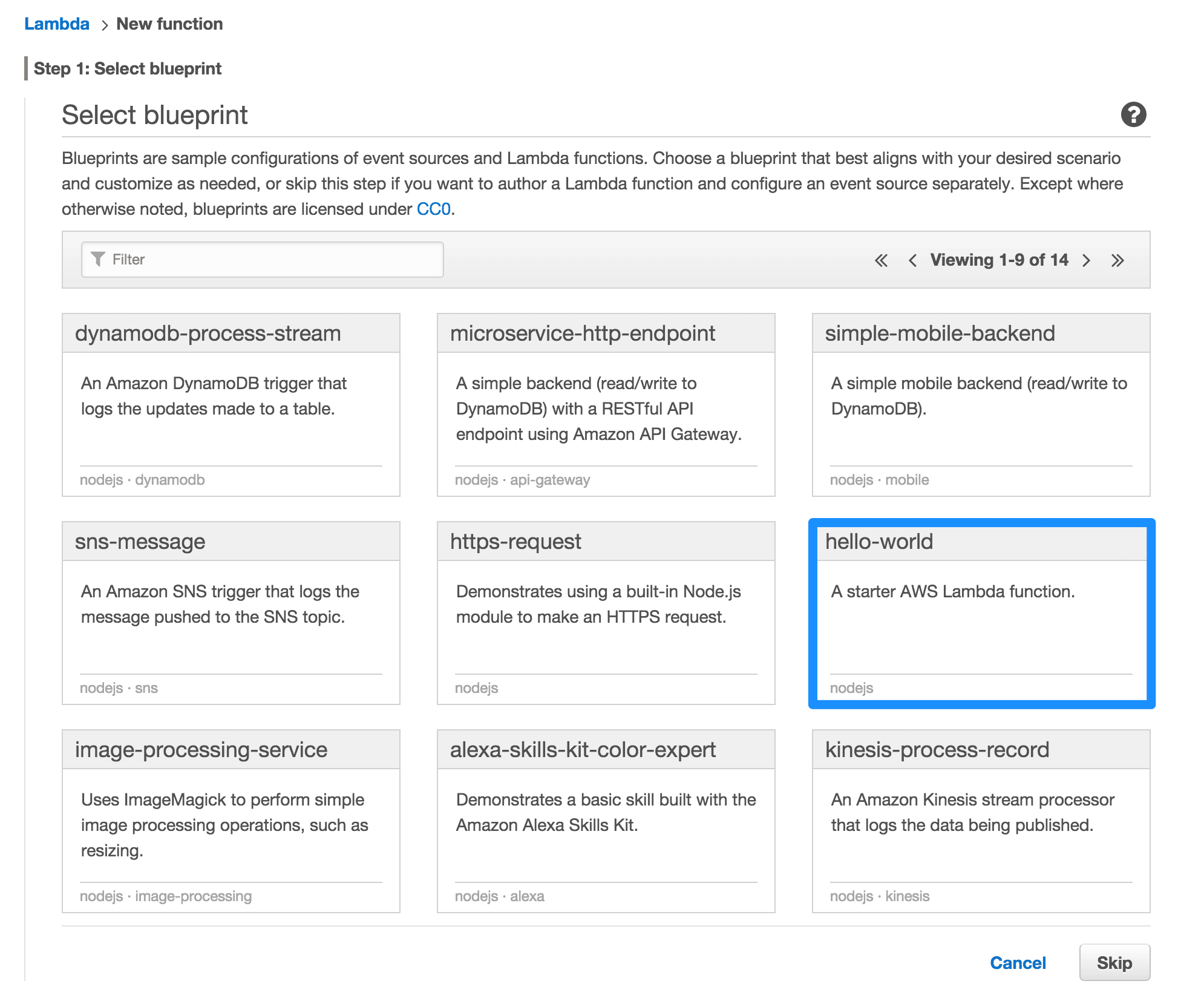
Figure 1: Selecting the initial template
Step 2
imos-lambda decides its behavior based on the function name, so set Name to exec (for the function used as the C++ compiler, enter gcc here). Set Description freely. The function code will be set later using the AWS CLI, so leave it as is. Create a new Role using the S3 execution rule. (Because the binary generated during compilation is placed on Amazon S3, this is necessary if you use the C++ compiler. If you do not use it, the Basic execution rule is fine.) Setting Memory is not required, but setting a larger memory size also improves CPU speed, so here I set it to the maximum of 1536 MB. Timeout lets you set the longest time a single request can run, and to keep flexibility as high as possible I set it to the maximum of 60 seconds.
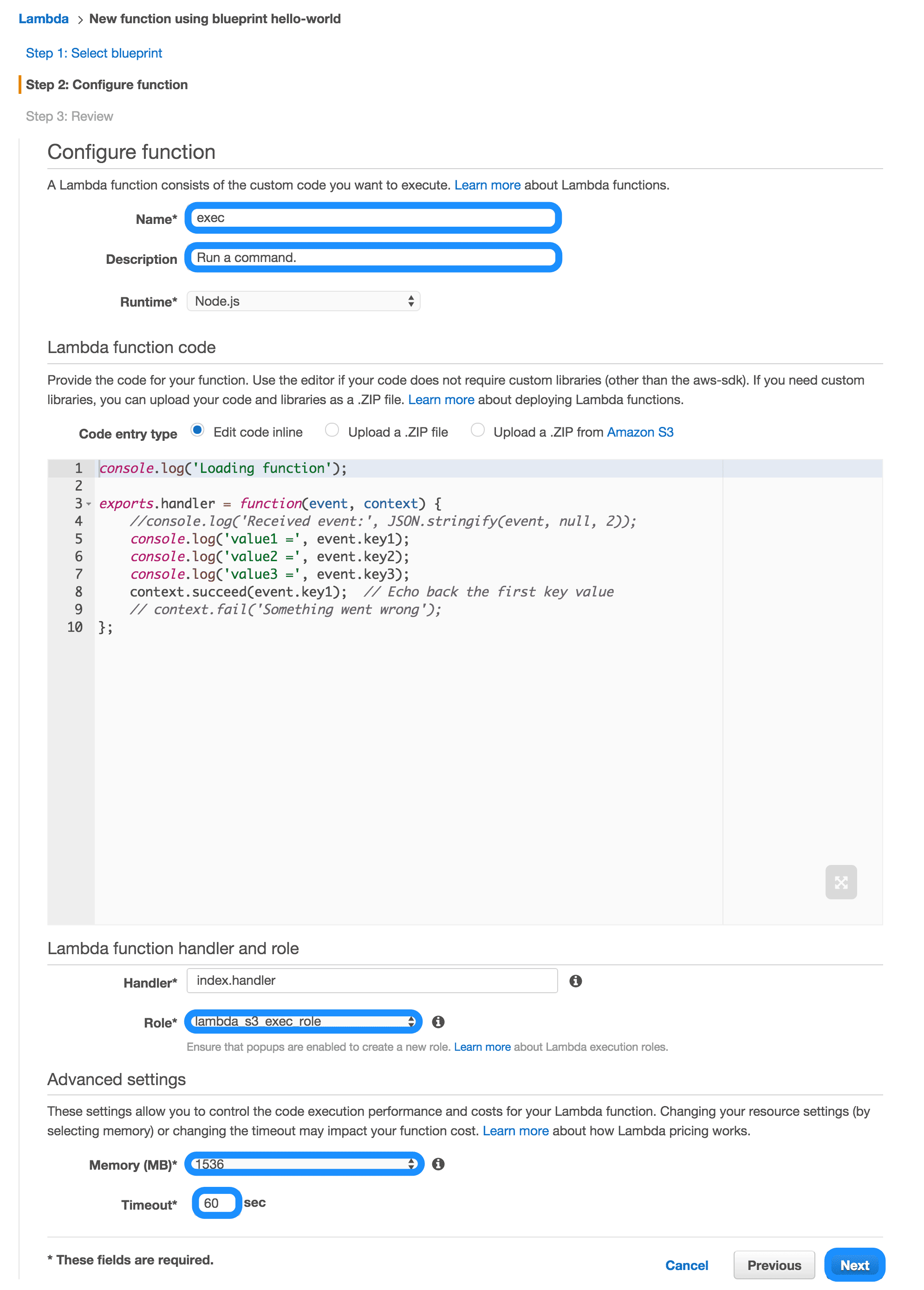
Figure 2: Configuring the function
Step 3
This is the confirmation screen. Pressing the "Create Function" button creates the function.
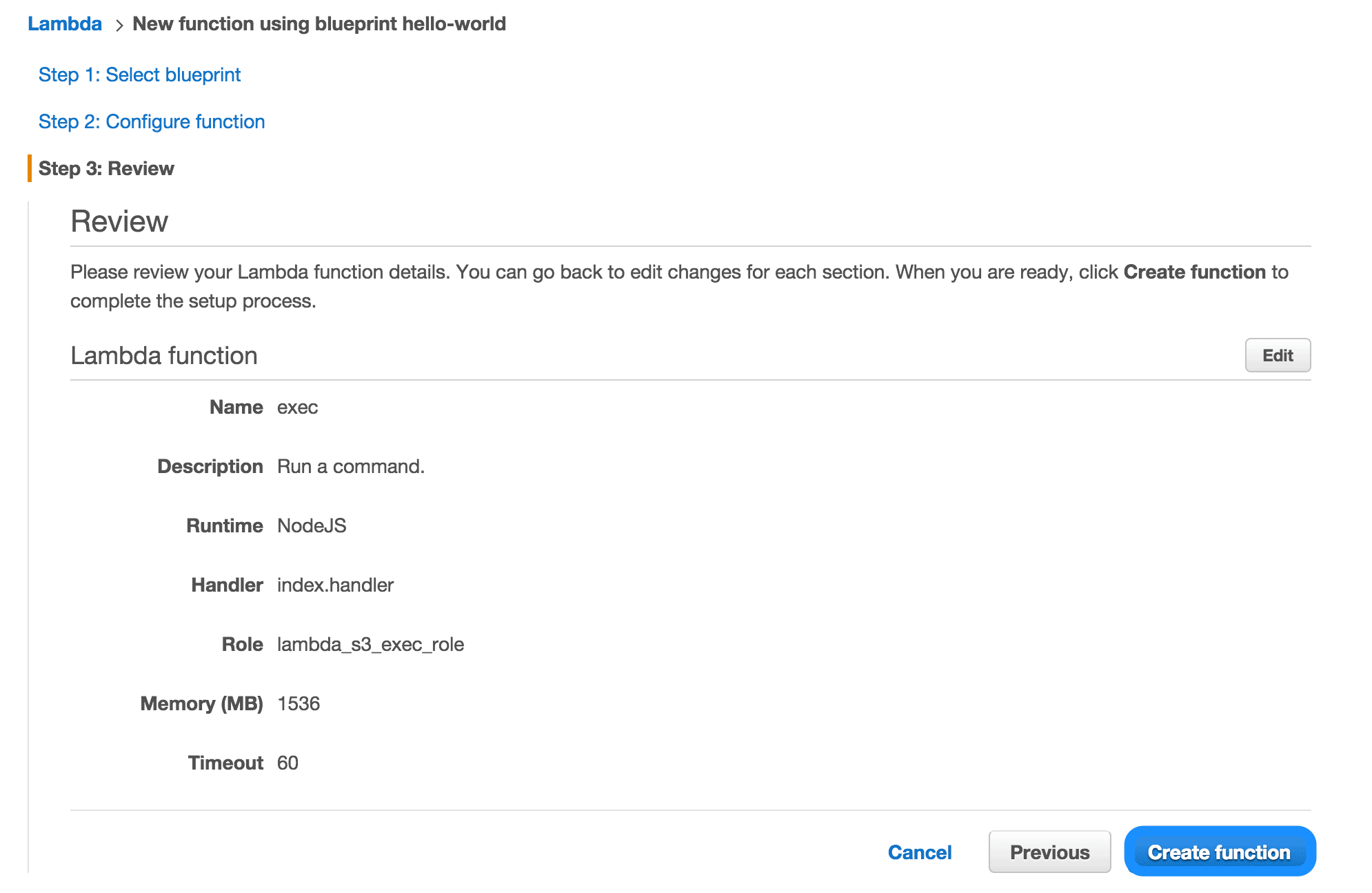
Figure 3: Confirmation screen
Setting up imos-lambda
Setting up exec
The main code is available on GitHub at imos/imos-lambda. imos-lambda requires the latest aws command and php. AWS Lambda is a recently created service and its API has been changing slightly, so I recommend installing and upgrading the aws command using pip.
# Your AWS credentials need to be configured, so set them up if you never have.
$ aws configure
# Check out imos-lambda.
$ git clone https://github.com/imos/imos-lambda
$ cd imos-lambda
# Overwrite the implementation code of the exec command in the us-west-2 region.
$ make install-exec REGION=us-west-2
# Add the cli directory to your PATH (you can also run it directly without doing so).
$ export PATH="$(pwd)/cli:${PATH}"
Usage
# Run uname -a with exec in us-west-2.
$ imos-lambda --region=us-west-2 uname -a
Linux ip-10-0-116-148 3.14.48-33.39.amzn1.x86_64 #1 SMP Tue Jul 14 23:43:07 UTC 2015 x86_64 x86_64 x86_64 GNU/Linux
REPORT RequestId: ee9dcb9f-61e2-11e5-871a-758370ef4d00
Duration: 17.38 ms
Billed Duration: 100 ms
Memory Size: 1536 MB
Max Memory Used: 17 MB
Elapsed time: 17 ms
Price: 0.0003 JPY
Setting up gcc
Add the gcc function on AWS Lambda in the same way as the exec function.
# Overwrite the implementation code of the gcc command in the ap-northeast-1 region.
$ make install-gcc REGION=ap-northeast-1
Usage
# By specifying with --bucket where to place the compiled object, you can compile and run.
$ time ./cli/imos-lambda --alsologtostderr --compiler=gcc \
    --input=sample/hello.cc --bucket=lambda.imoz.jp
I0924 02:11:50.860107 9265 imos-lambda:42] Compiling...
I0924 02:11:51.788474 9265 imos-lambda:50] Successfully compiled: ephemeral/2e5b0e60-6216-11e5-8b25-81a8e743b35c
I0924 02:11:51.796413 9265 imos-lambda:59] Invoking function.
Hello world!
REPORT RequestId: 2ee8a8ad-6216-11e5-a46c-b34664c0aa4d
Duration: 166.26 ms
Billed Duration: 200 ms
Memory Size: 1536 MB
Max Memory Used: 52 MB
Elapsed time: 165 ms
Price: 0.0006 JPY
I0924 02:11:52.260542 9265 imos-lambda:79] Completed.

real  0m1.499s
user  0m0.335s
sys 0m0.093s
# Using the --replicas flag lets you run in parallel.
# trip.cc is a program that searches for tripcodes.
$ time ./cli/imos-lambda --alsologtostderr --region=us-west-2 \
    --compiler=gcc --input=sample/trip.cc \
    --bucket=lambda.imoz.jp --compiler_flags='-lcrypt -O2' \
    --arguments=imos --replicas=90 2>/dev/null
olunfpnc imosUVXN6M
twnzekyc imosOkBO9w
yvmxkhci imosJ7WMaY
waetzigk imosnC.OMI
zwgilupk imosKI4urQ

real  0m37.351s
user  0m18.814s
sys 0m3.613s
Appendix
How gcc-min.tar.xz was generated
I generated it by compiling gcc 4.8 with /tmp/gcc specified as the installation destination. However, in that state it exceeds 50 MB even after xz compression, so I deleted /tmp/gcc/libexec/gcc/*/(lto1|cc1), which take up space and are not essential. Also, because required libraries and headers such as glibc are needed, I used the rpm -ql command to copy the files contained in the kernel-headers, glibc-headers, and glibc-static packages. Since libc.so specifies absolute paths, I edited it with a text editor to reference the files inside /tmp/gcc. In addition, because the libcrypt.a on CentOS is broken, I copied and used the one from Ubuntu.
Benchmarking AWS Lambda
Using the Dhry benchmark of UnixBench, I measured the integer arithmetic speed in the Tokyo region. It does not seem that AWS Lambda's limits are fully used up, but as the degree of parallelism increases, CPU utilization appears to drop.
- c4.large … 0.426 Mlps (3.5 ECU)
- AWS Lambda (single) … 0.351 Mlps (2.88 ECU), total 0.351 Mlps (2.88 ECU)
- AWS Lambda (at 100-way parallelism) … 0.264 Mlps (2.17 ECU), total 26.4 Mlps (288 ECU)
- AWS Lambda (at 500-way parallelism) … 0.242 Mlps (1.99 ECU), total 121 Mlps (994 ECU)
References