Setting up an environment for team contests
Compared with contests lasting only a few hours, contests over this kind of period place greater importance on code readability and stability, but unlike business programming, long-term maintainability is unnecessary. In most cases there is no need to write unit tests, and having a simple integration test (an end-to-end test) helps development go smoothly.
In this article I explain how Unagi develops during contests, introducing the tools we actually use.
Communication Tools
- Document sharing (Google Docs) … Extremely convenient as a place to organize the problem statements and notes. Since everyone can edit the document at the same time, even when a wide variety of information needs to be organized—such as right after a contest starts—everyone can edit simultaneously. Preparing a landing page with a collection of links and an overview of the problem means that when someone gets stuck they no longer need to ask their teammates, which improves communication efficiency (example: ICFPC 2014). Although I have removed it from the example, it is also very convenient to keep information such as the passwords for the contest pages there at the same time, which saves the trouble of searching for them—including for yourself.
- Chat tool (Skype) … Convenient for pasting information that does not need to be organized during the contest (error logs, URLs, and so on). It is also very handy for communication before and after the contest.
- Mailing list (Google Groups) … If you register a mailing list address as the address you give to the contest organizers, there is no need to forward and share emails within the team, which is convenient.
File Sharing Tools
- File sharing (Dropbox) … Before the contest starts, we designate a folder to share in advance. It is used not only for sharing files, but we also basically do all of our coding inside Dropbox. You can refer to your teammates' code at any time, and it eliminates the effort involved in exchanging files. This makes it possible to work calmly even in situations such as just before the contest ends.
- Source code sharing (Github) … Used mainly for the final submission of code. By periodically placing source code and tools that are likely to be used for submission there, you can reduce the risk of data loss from deletion or overwriting compared with Dropbox.
Development Environment
For the servers used for development, in the case of ICFPC we share and use machines with the best specs we can afford (32 CPUs, 244GB of memory, etc.). Compile times get shorter and execution times get shorter, so we can speed up the development cycle. On the other hand, since the specs are fixed in ISUCON, we gave each member a separate instance so that they would not interfere with one another.
In addition to the development servers, we also set up a Dropbox server. Handling Dropbox sharing on each instance becomes hard to manage (Dropbox sharing occasionally gets stuck), so only one specific machine syncs with Dropbox, and the other instances mount the shared folder to the /dropbox directory using SSHFS. With Dropbox, once you save source code locally, syncing usually completes in a few seconds, so each person edits source code in their own development environment and compiles and runs it on the server (reference: Installing a Dropbox environment using Docker).
Amazon AWS Tips
- Elastic IP Address … We prepare fixed IPs in advance and assign a short domain to each of them (example: jp01.sx9.jp). This makes management easier than dealing directly with raw IP addresses.
- Spot Instances … Although spot instances carry the risk of the instance suddenly being stopped compared with regular instances, they let you use computing resources at a fraction of the price. This lets you obtain several times the computing resources at roughly the same cost. We check past prices not just at the region level but at the zone level, and request development instances at about three times the price of a regular instance and execution instances at a random price of one to several times. In this way it is possible to use plenty of resources while avoiding sudden shutdowns. (To prepare for sudden shutdowns, ideally any information that must be preserved is kept on Dropbox. Considering things like rebuilding instances, we remind teammates not to place data directly on the instance.)
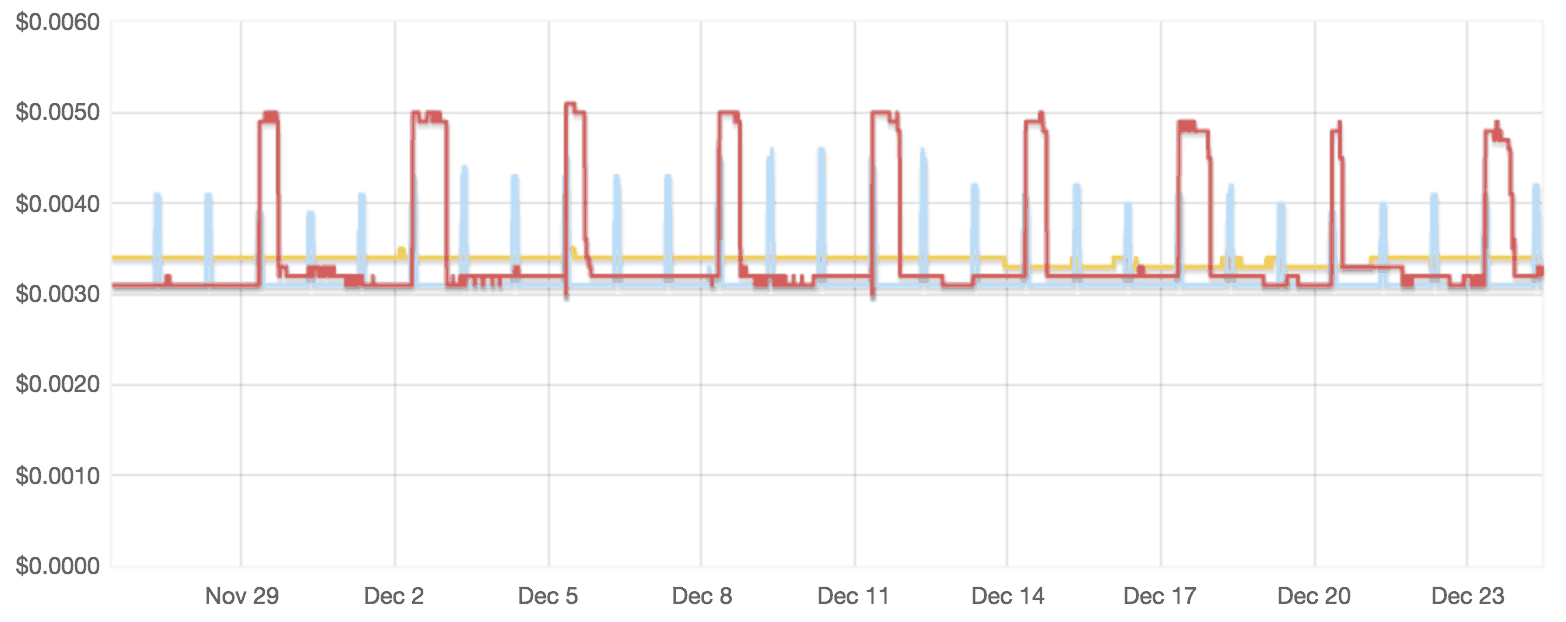
Figure 1: Price fluctuations of spot instances
In the case of this fluctuation, we concentrate our instances in the yellow zone
(by spreading instances across multiple zones, you can also lower the risk of all of them stopping at the same time)
In the case of this fluctuation, we concentrate our instances in the yellow zone
(by spreading instances across multiple zones, you can also lower the risk of all of them stopping at the same time)
Inter-Program Communication
In business development, using some kind of RPC is standard, but since all of Unagi's team members come from competitive programming, we use the kind of input/output formats commonly used in competitive programming (example: ICFPC 2013 Input/Output Specification).
This approach of using standard input/output also lets you run parallel computations using many computing resources without changing the specification, by executing commands via SSH. At ICFPC 2013 we connected servers to each other with SSH to form a cluster.
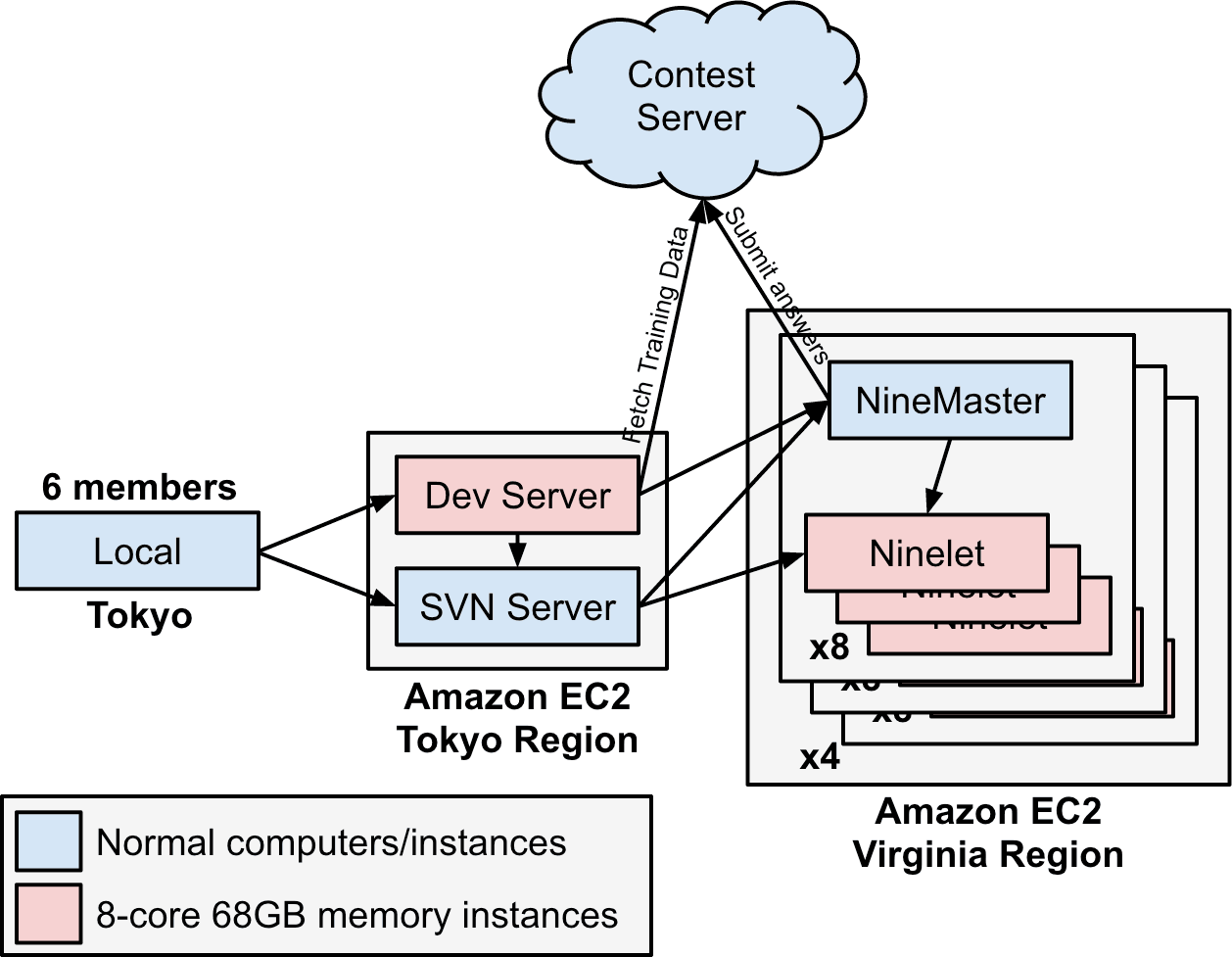
Figure: Topology of the servers used at ICFPC 2013
(In ICFPC 2014 and ISUCON, the SVN Server is replaced by the Dropbox server)
(In ICFPC 2014 and ISUCON, the SVN Server is replaced by the Dropbox server)